
02Retail Operating System for Clothing Shops
CleverOp Fashion
A clothing shop sells the same shirt in five sizes and four colours, at the till, on Instagram and through a courier. CleverOp Fashion keeps every one of those pieces, sales and dollars in one place.
- Role
- Product, design & engineering
- Timeline
- October 2026 – present
- Platform
- Windows 10/11 · fully offline
- Status
- v0.6.29 · live with first customer
- Languages
- English · Français · العربية
- Flutter
- Desktop
- Retail
- Point of Sale
- Inventory
01
Problem
Most small shops run on a cash register, a notebook and a WhatsApp chat. Stock is counted by model, not by size, so the size that sells out is noticed only when a customer asks for it.
- Popular sizes sell out while the rest of the model sits on the shelf
- Online orders and courier cash tracked on paper or in chats
- Prices in two currencies worked out by hand at the till
- Exchanges and markdowns that quietly break the stock count
- No clear answer to what the shop really kept this month
02
Product
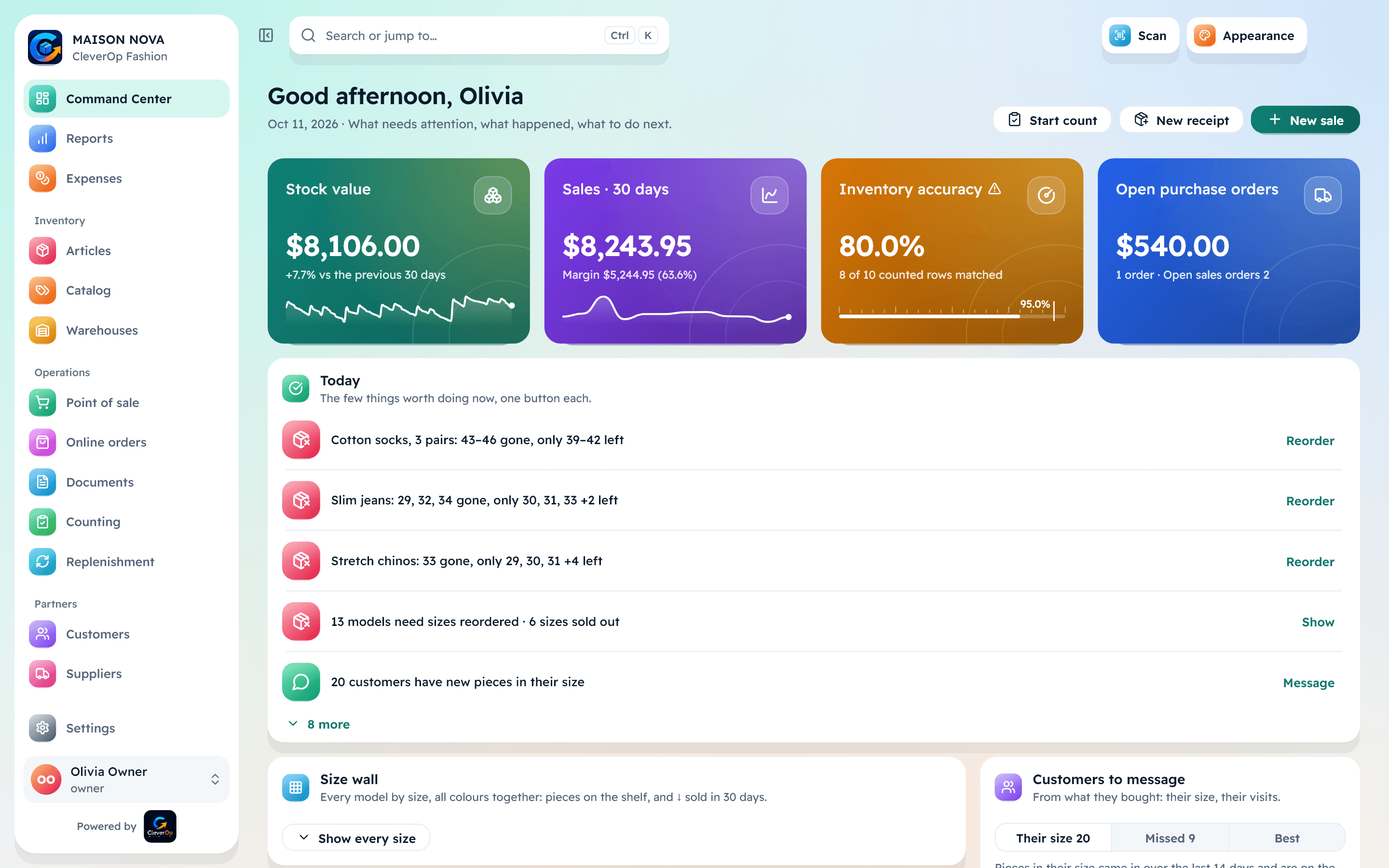
One desktop application for the whole shop, organised around the people who use it — cashiers at the till, staff handling online orders, and the owner deciding what to reorder or mark down.
Point of sale
Scan or tap a model, pick size and colour, take USD or LBP with a built-in calculator, print the receipt and open the drawer.
Size × colour stock
One variant per size and colour, a size wall per model and reorder suggestions that follow the size curve.
Exchanges & returns
Find the sale by scanning the piece; only the difference changes hands.
Online orders
Instagram, WhatsApp and phone orders from reservation to dispatch, delivery and the courier’s cash.
Collections & markdowns
Summer and winter collections, seasonal markdowns and sell-through by collection.
Customers
Sizes and visits per customer, and who to message when new pieces arrive in their size.
Reports & expenses
25 reports including net profit, busy hours and stock turnover, exported to PDF, Excel or CSV.
Administration
Users, roles and permissions, audit trail, verified backups and a daily report to a synced folder.
03
Core Workflow
From the supplier’s delivery to the money in the drawer, every piece follows the same path — and every movement lands in the same ledger.
- 01
Receive
Models created by size and colour, imported from a spreadsheet or added inside the receipt; tags printed with barcodes.
- 02
Sell
At the till or as an online order; prices, markdowns and tax always come from the pricing service, never from the ticket.
- 03
Exchange
A return and a new sale in one transaction; only the difference is paid or refunded.
- 04
Deliver
Orders go out with a courier, come back delivered or refused, and the courier settles the cash.
- 05
Reorder
The size wall shows what sold out; a draft purchase order follows the size curve.
- 06
Review
Net profit, sell-through and a daily PDF tell the owner what the shop really kept.
04
Architecture
A local-first monolith: no server and no subscription. One Windows PC runs the shop from a single business file, and the same codebase also ships as a cross-industry edition.
Interface
Flutter · Riverpod · go_router
Custom design system, touch and keyboard modes, light and dark
Documents
Receipts, invoices, delivery slips, price tags and reports as PDF
Domain
Pure-Dart services
One posting service; pricing, costing and permissions enforced in services
Pulse engine
Deterministic insights: sizes to reorder, dead stock, customers to message
Data
SQLite via Drift
Append-only stock and party ledgers · versioned migrations
Windows
Shop hardware
Receipt printer, cash drawer, label printer, barcode scanner and customer display
Signed MSIX
Build-time edition with a one-time device license
05
Engineering Challenges
- 01
One immutable ledger
Stock never changes in place. Every sale, receipt, transfer, count and exchange is a posted movement, and a ledger check can rebuild every quantity from history.
- 02
Two currencies, exact to the cent
Lebanese shops price in dollars and are paid in dollars and lira. Rates are dated and append-only, money is fixed-point, and change is rounded to the cash step in the currency handed back.
- 03
Prices the till cannot bend
Markdowns, customer price lists and tax resolve in one pricing service. A cashier’s discount has a limit; going beyond it needs a manager’s password, checked and audited.
- 04
Online orders that keep stock honest
An order reserves its pieces, dispatch posts the sale, refused pieces return on a credit note, and each courier has an append-only cash ledger per currency.
- 05
One codebase, two products
The fashion edition is chosen at build time: setup locks to the clothing profile and unrelated features are compiled out of the interface, while the cross-industry build stays unchanged.
06
Reliability & Security
Reliability
- Every schema upgrade copies the business file first, then migrates in place.
- Backups are written with VACUUM INTO, verified by integrity and ledger checks, and taken automatically each day.
- Restore checks and upgrades a temporary copy first and keeps the replaced file.
- Audit suites open every page in every role, check every report against raw SQL and try hostile input on every control.
- 550 automated tests, plus screen captures of every page in English, French and Arabic, light and dark.
Security
- Passwords hashed with Argon2id, with a sign-in lockout.
- Permissions enforced in the domain services — the sales role sees no report.
- A one-time device license signed with Ed25519 and verified offline.
- Every important action audited: prices, markdowns, discounts, documents, users and backups.
- Daily owner PDFs can be password-protected before they leave the shop PC.
07
Technology
- Interface
- Flutter 3DartRiverpodgo_router
- Data
- SQLiteDriftVersioned migrations
- Platform
- Windows FFIMSIXpdfexcel
- Quality
- flutter_testintegration_testflutter analyze
08
Screenshots
Screenshots from the built-in demo shop — names and figures are fictional.
- CleverOp Fashion
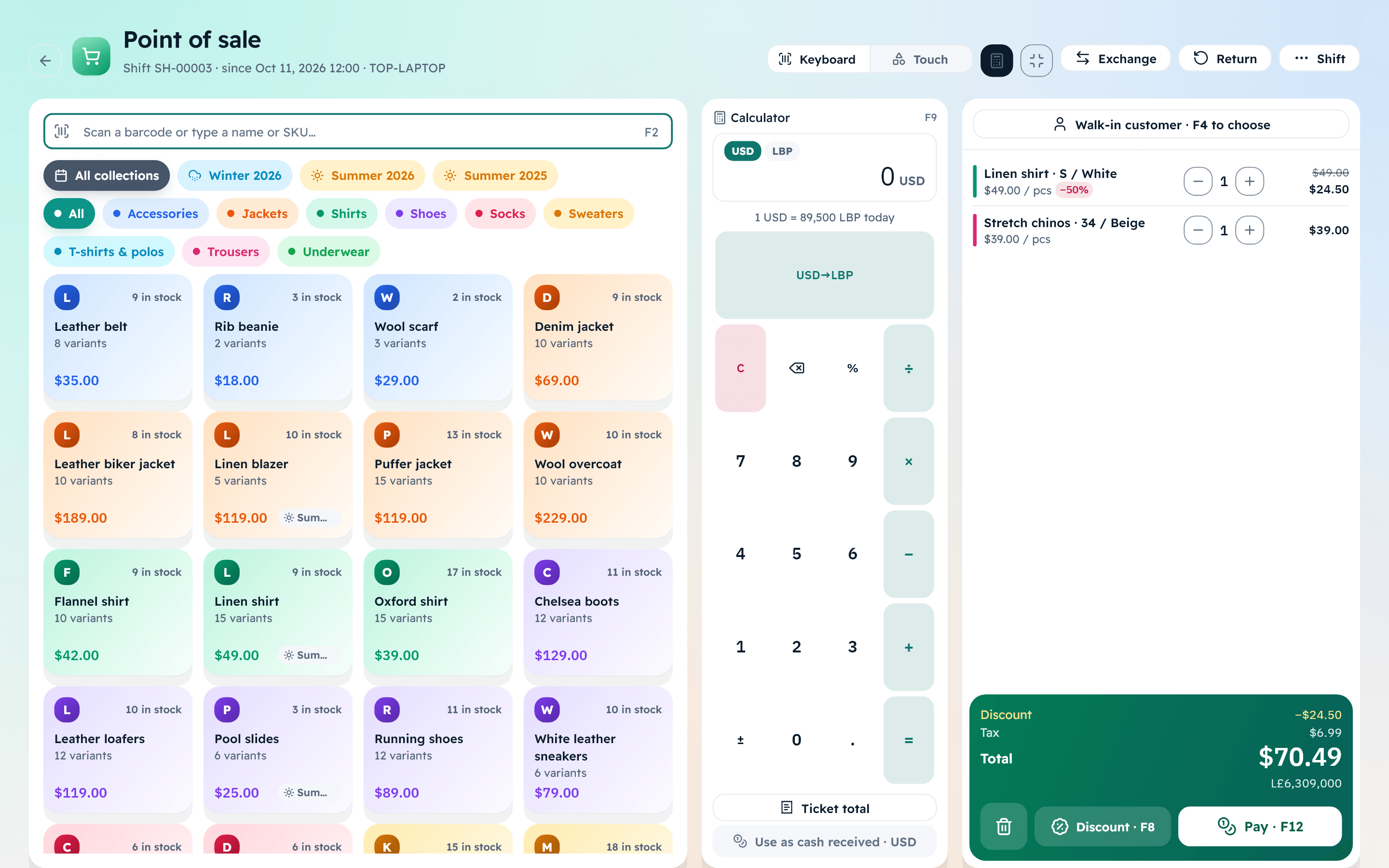
Point of sale — models by collection and category, a dollar–lira calculator beside the ticket, markdowns applied by the system. - CleverOp Fashion
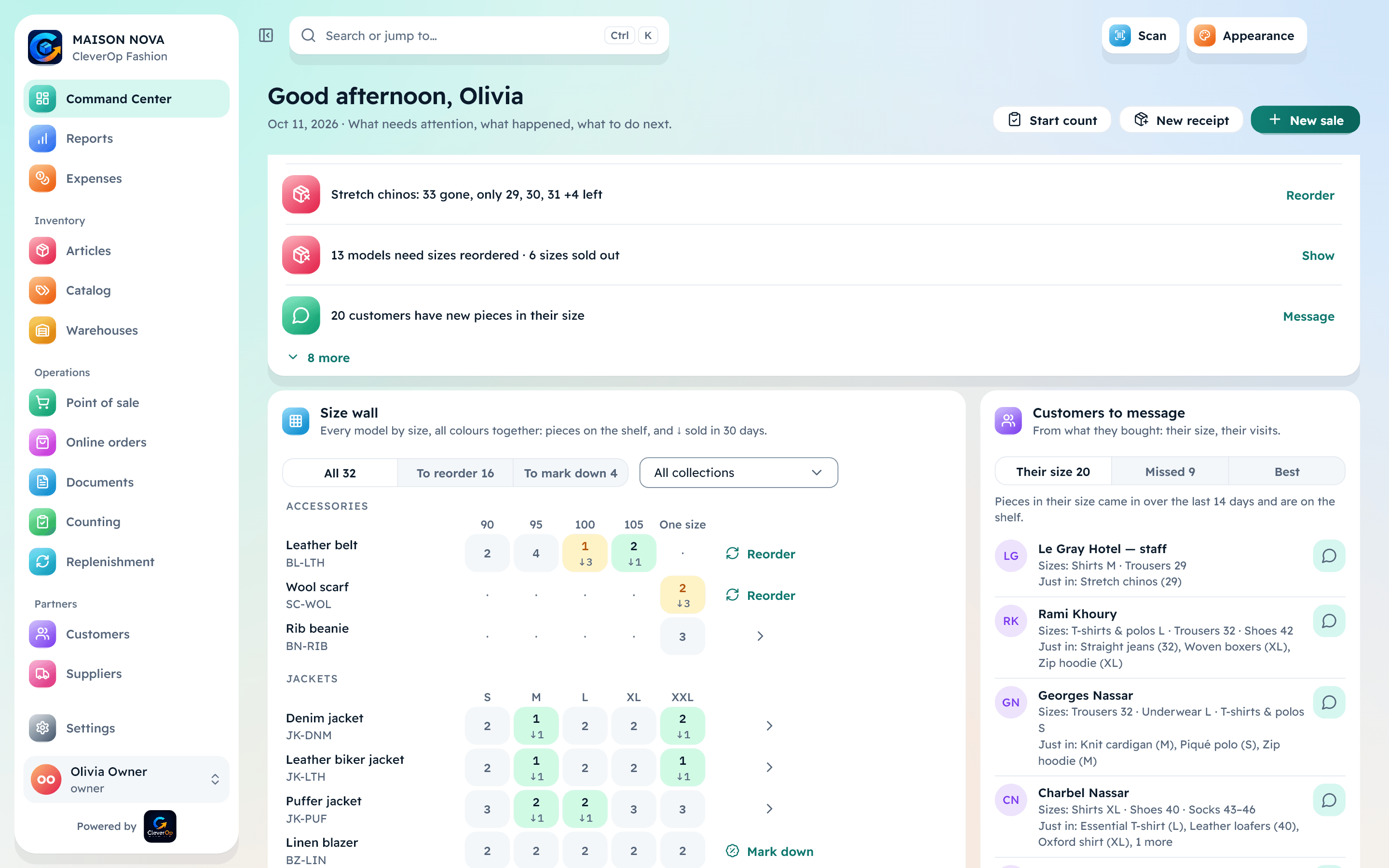
Size wall — every model by size, what is left and what sold, with the next action on each row. - CleverOp Fashion
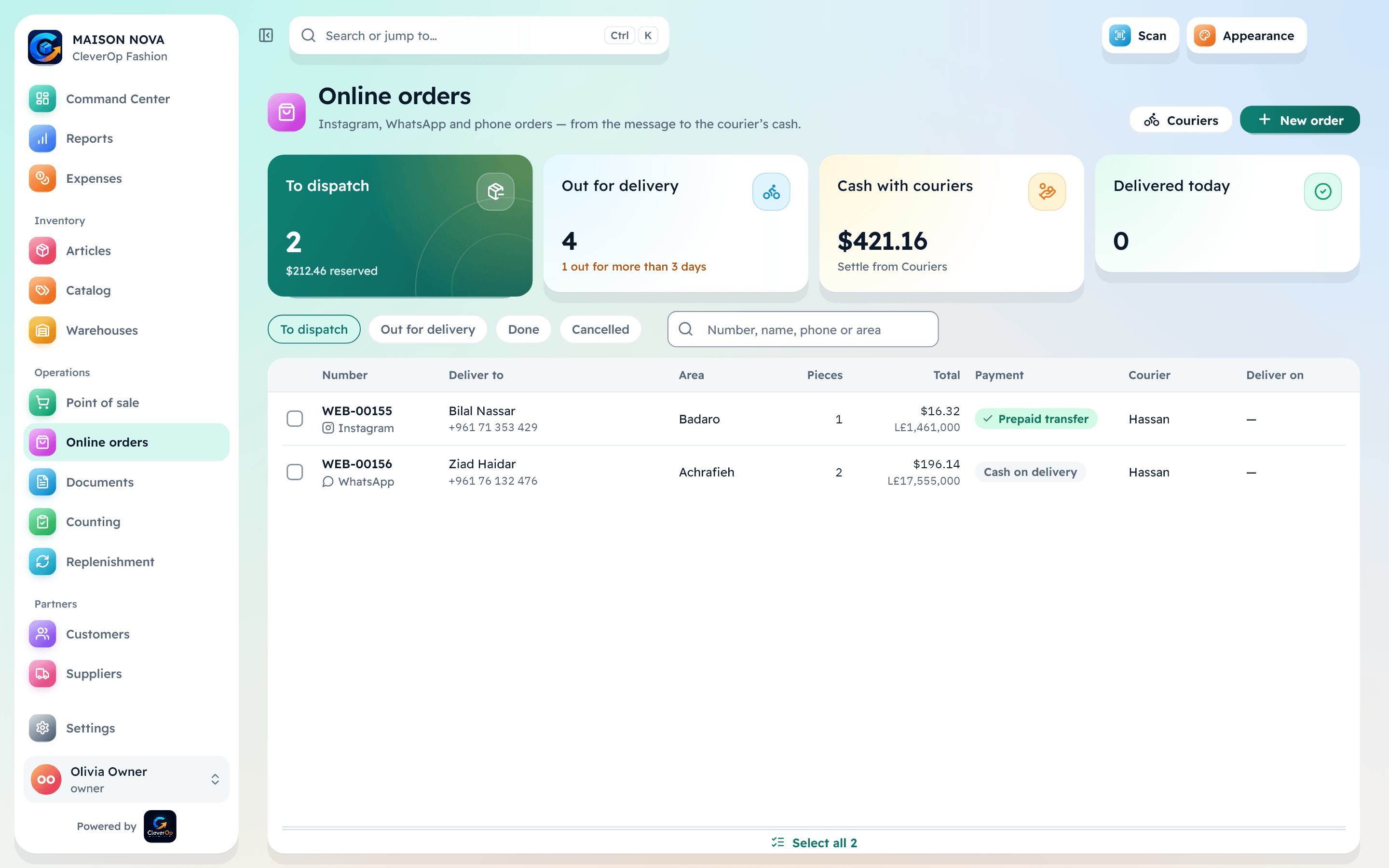
Online orders — from the Instagram or WhatsApp message to the courier’s cash. - CleverOp Fashion
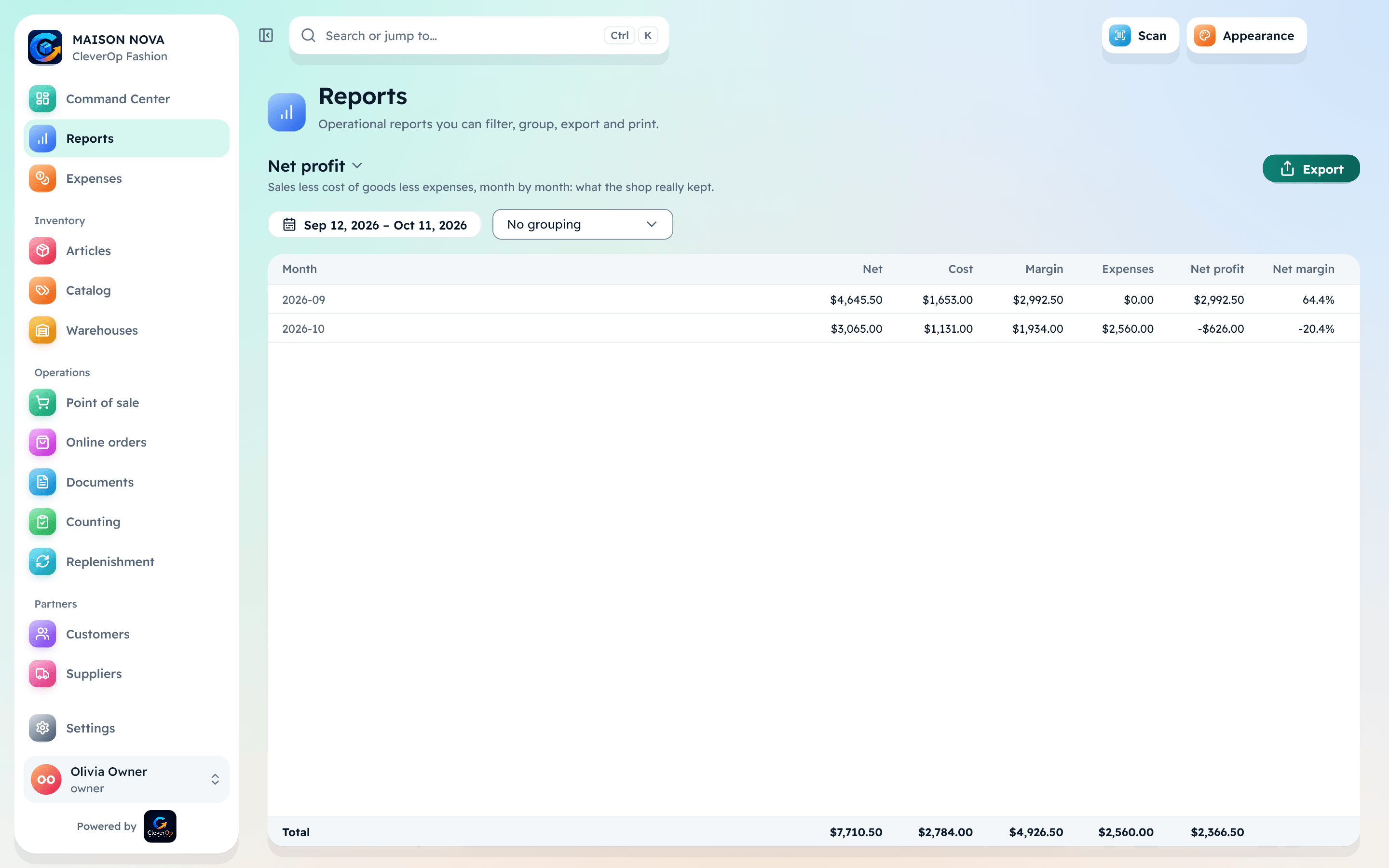
Net profit — sales less cost of goods less expenses: what the shop really kept. - CleverOp Fashion
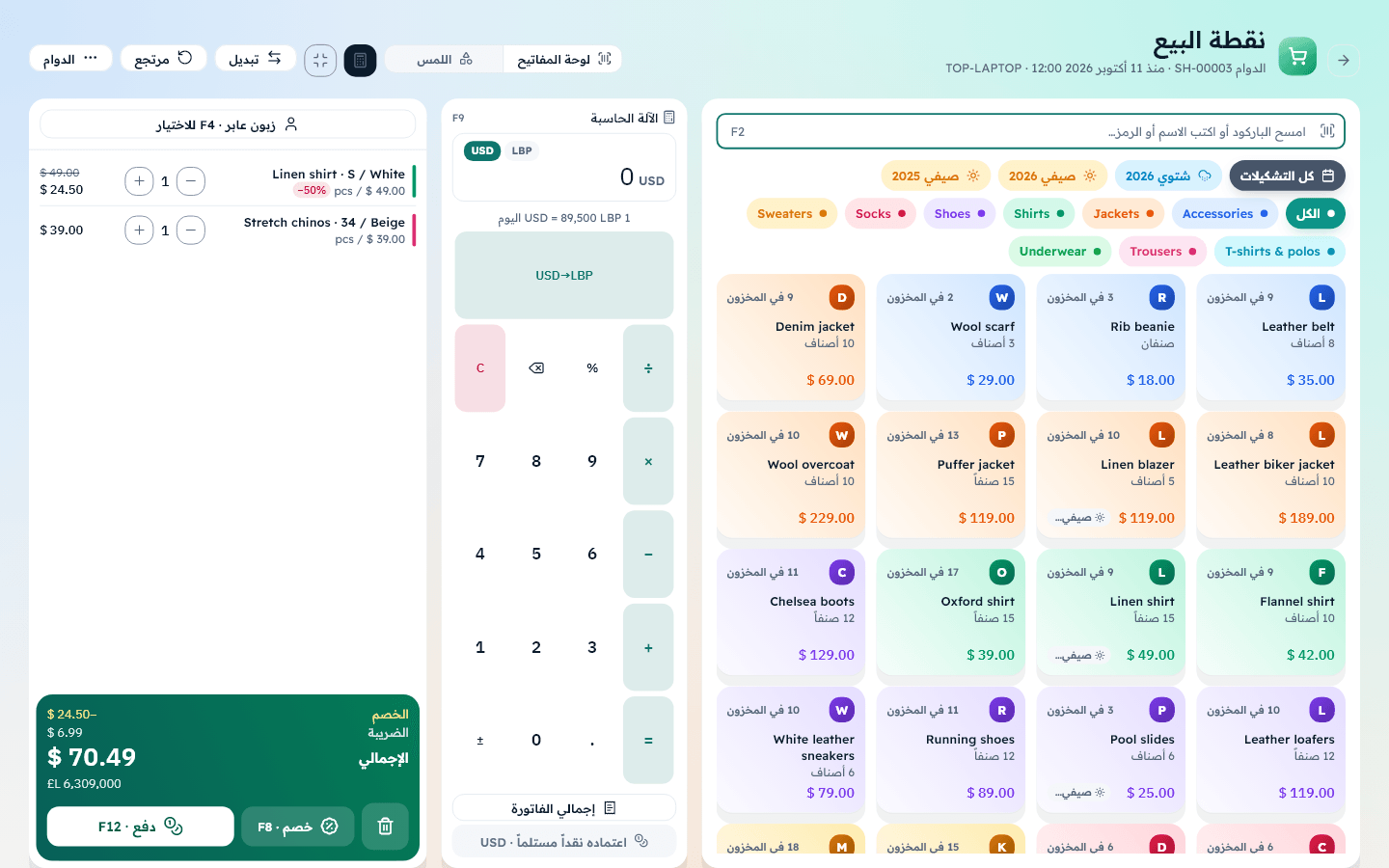
Arabic, right to left — the same till for staff who work in Arabic.
09
Lessons
“Count what the customer asks for.”
Nobody asks for a shirt; they ask for a medium in navy. Stock, reorders and reports follow the size, not the model.
“Build for the till first.”
The cashier has a queue and a customer waiting. Scanning, two currencies and exchanges have to take seconds.
“Ship to a real shop early.”
Releases driven by the first customer’s screen, printer and display found what no test would.
10
Current State
v0.6.29 · live with first paying customer
CleverOp Fashion runs at its first paying customer, a menswear shop in Beirut, and ships as a signed Windows package. Releases follow the shop’s daily feedback.
- Working: till, exchanges, size × colour stock, online orders and couriers, collections, markdowns, expenses, 25 reports, backups and the daily report.
- Not built yet: multi-PC sync and an online storefront; the installer is signed with a pilot certificate, not yet a production one.
Start a Project
Need software built around your workflow?
I design and build business applications with the same care you see here.