
02Production Cost & Waste Control
CleverOp Yield
Bakeries price their products from recipes. The bench rarely follows the recipe exactly. CleverOp Yield measures the difference and puts a price on it.
- Role
- Product, design & engineering
- Timeline
- September 2026
- Platform
- Windows 10/11 · fully offline
- Status
- v1.1.0 · installer built
- Languages
- English · العربية
- Flutter
- Desktop
- Production
- Cost Control
- Business Software
01
Problem
A few percent extra butter, a batch that came out short, product thrown away at closing — each loss is small, but together they erase margin, and nobody can see where the money went.
- Ingredient over-use goes unnoticed on a busy bench
- Low-yield batches hide inside daily volume
- Waste is recorded on paper, if at all
- Prices change, but product costs are calculated once and forgotten
02
Product
Operators record what each batch really used and produced. CleverOp Yield compares it with the recipe, costs the batch at the prices of its day, and raises the unexplained part of the loss for the owner to review.
Batches
A weigh-and-enter flow for operators, fully keyboard driven.
Waste
Recorded on a batch or on its own, valued at the right price.
Anomalies
An inbox of losses to explain, each reviewed with a cause and a note.
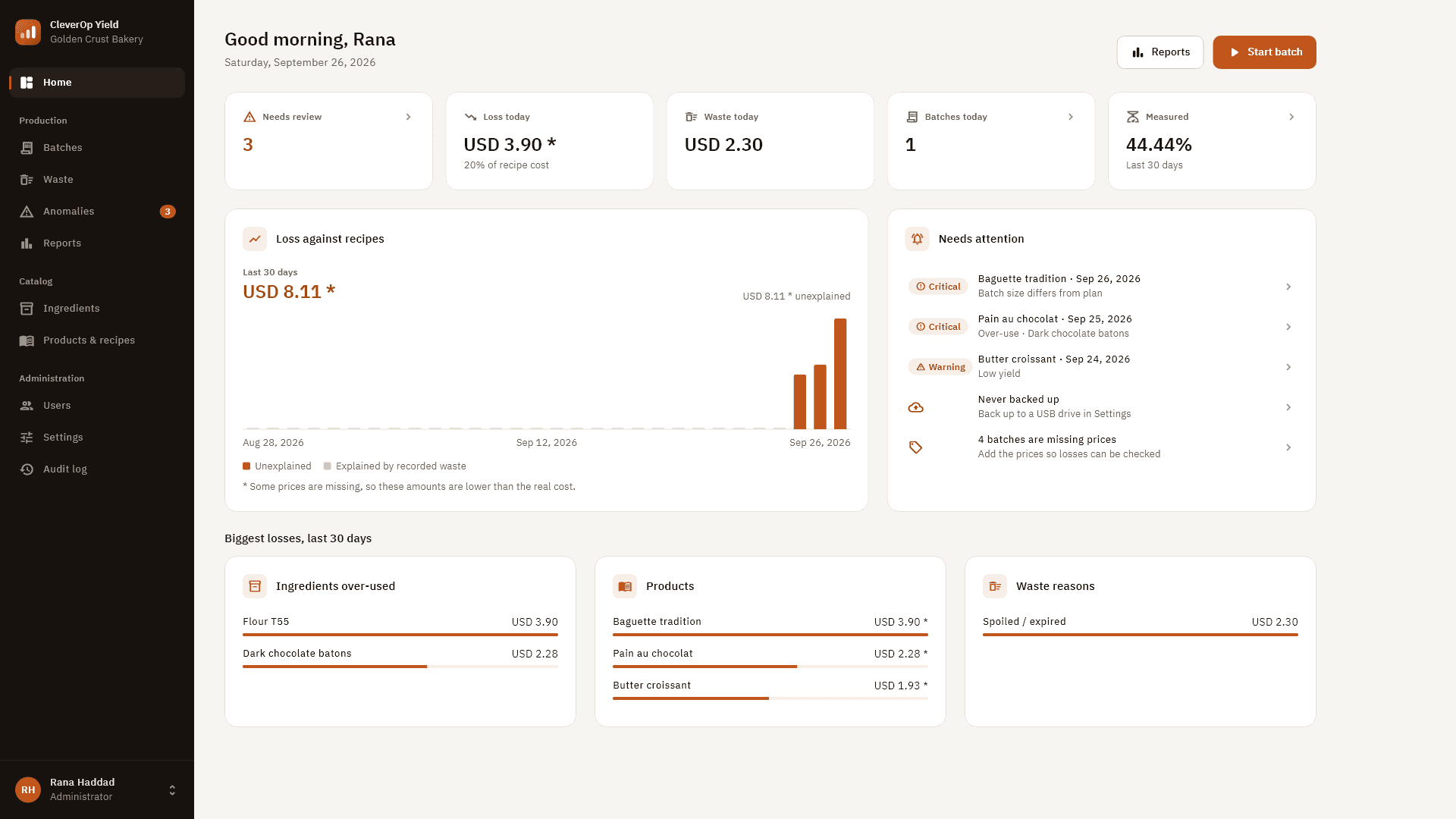
Dashboard
Loss against recipes, what needs attention and the biggest losses.
Reports
Variance, waste and product cost for any period, exported to PDF.
Catalog
Ingredients, prices, products, recipes and intermediates like laminated dough.
Users & audit
Administrator and operator roles, with a full audit log.
Backup & demo
Validated backup and restore, plus a demo bakery kept in its own file.
03
Core Workflow
From recipe to review, every batch follows the same path — and every number on the way can be traced back to who entered it and how.
- 01
Recipe
Ingredients, quantities and prices, including intermediate products.
- 02
Start batch
Pick the product and planned output; recipe quantities are scaled.
- 03
Weigh
Enter the measured quantity per line — or confirm the recipe. Must-weigh ingredients can only be measured.
- 04
Output & waste
Good output and waste recorded against the batch.
- 05
Variance
Every line compared with the recipe; yield compared with plan.
- 06
Batch cost
Costed at the prices of its production date — frozen and exact.
- 07
Anomalies
Over-use, low yield, unexplained loss and statistical outliers raised automatically.
- 08
Review
The owner records a cause and a note. Every decision is audited.
04
Architecture
A local-first monolith: no server, no account, no internet. Everything runs in-process on one Windows PC, with the database in the user’s own profile.
Interface
Flutter · Material 3
Custom design system · Riverpod · go_router
Charts & PDF
Hand-drawn charts · pdf export with bundled Arabic font
Domain
Pure-Dart services
Costing, variance, anomaly engine, roles enforced in services
Audit
Language-neutral audit events, rendered in the reader’s language
Data
SQLite via Drift
Versioned migrations in one transaction, with a copy made first
Windows
Native APIs via FFI
CNG password hashing · Save/Open dialogs · Documents folder
Installer
Per-user Inno Setup installer, no admin rights needed
05
Engineering Challenges
- 01
Exact money on a desktop
Money is stored in integer micro-units and quantities in milli-units. Costs are computed exactly with BigInt and rounded once, at the very end.
- 02
A confirmation is not a measurement
A typed quantity is measured; taking the recipe quantity is recipe-confirmed and never counted as a measurement. Reports show how much of production was actually weighed.
- 03
Anomalies worth trusting
Loss is judged only on fully priced batches. Outliers need |z| ≥ 3 against up to 20 earlier batches of the same product. A reviewed anomaly is raised again only if it gets worse.
- 04
Costs that stay true over time
Each line freezes its cost basis at the production date. Later price changes only fill gaps — they never rewrite history.
- 05
Operators never see money
Authorization lives in the domain services, not the interface. Operators never receive prices, costs or yield percentages — not even in raw data.
06
Reliability & Security
Reliability
- Every schema upgrade runs in one transaction, after a copy of the database is made.
- Backups are written with VACUUM INTO and validated before they are kept.
- Restore accepts only genuine, undamaged backups — integrity, foreign keys and an exact schema allow-list are checked.
- The current data is always set aside before a restore, so it can be undone.
- 200 automated tests plus 56 golden-screenshot UI tests in English and Arabic.
Security
- Passwords hashed with PBKDF2-HMAC-SHA256 through Windows CNG.
- A session lock that covers dialogs and menus; unlocking re-verifies the user.
- At least one active administrator is always kept, enforced in a transaction.
- A full audit log of prices, recipes, batches, corrections, reviews, backups and exports.
- Stated openly: anyone sharing the same Windows account can open the database file.
07
Technology
- Interface
- Flutter 3DartMaterial 3Riverpodgo_router
- Data
- SQLiteDriftVersioned migrations
- Platform
- Windows FFIpdfInno Setup
- Quality
- flutter_testGolden screenshotsflutter analyze
08
Screenshots
Screenshots from the built-in demo bakery — names and figures are fictional.
- CleverOp Yield
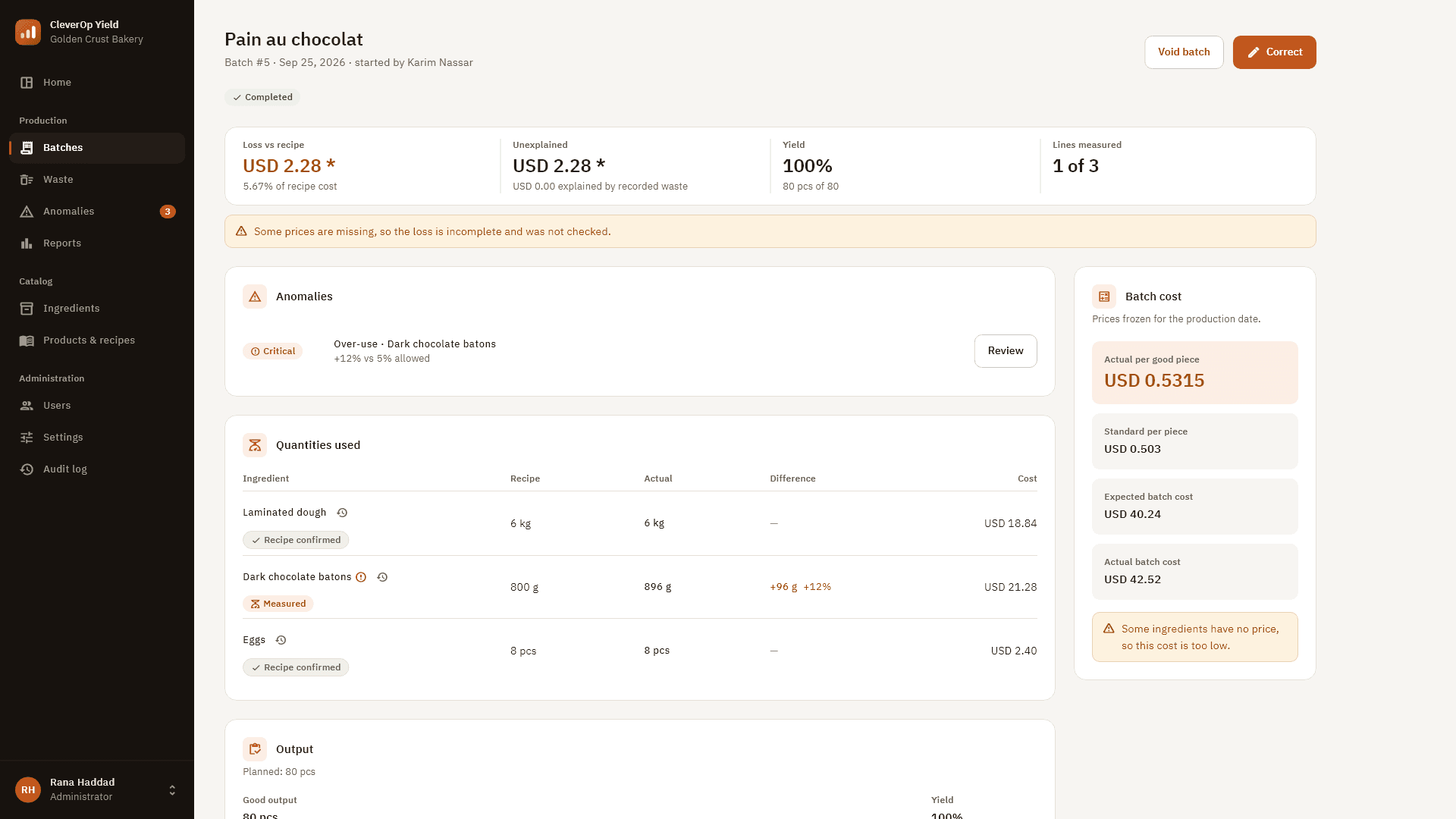
Batch detail — every line against the recipe, measured vs. confirmed, with a critical over-use flagged. - CleverOp Yield
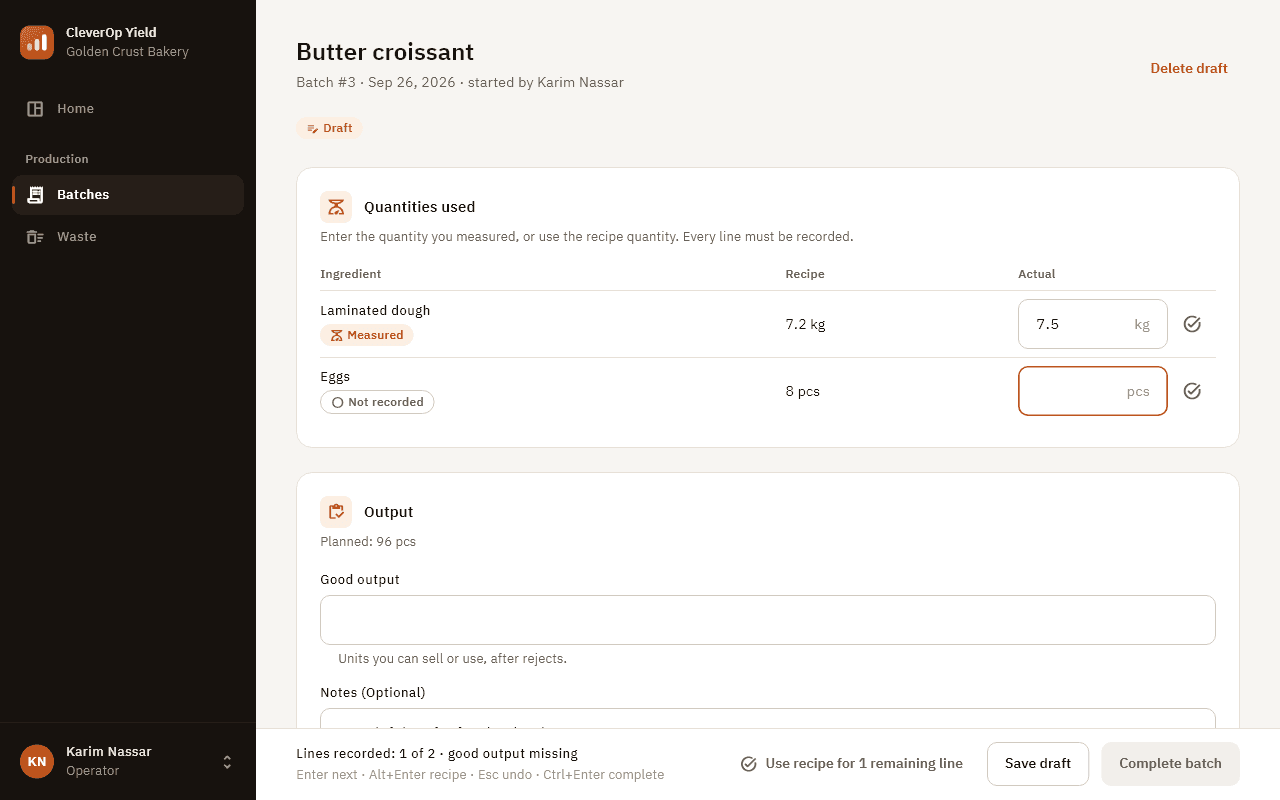
Operator view — a weigh-and-enter flow with keyboard shortcuts. No prices, no costs. - CleverOp Yield
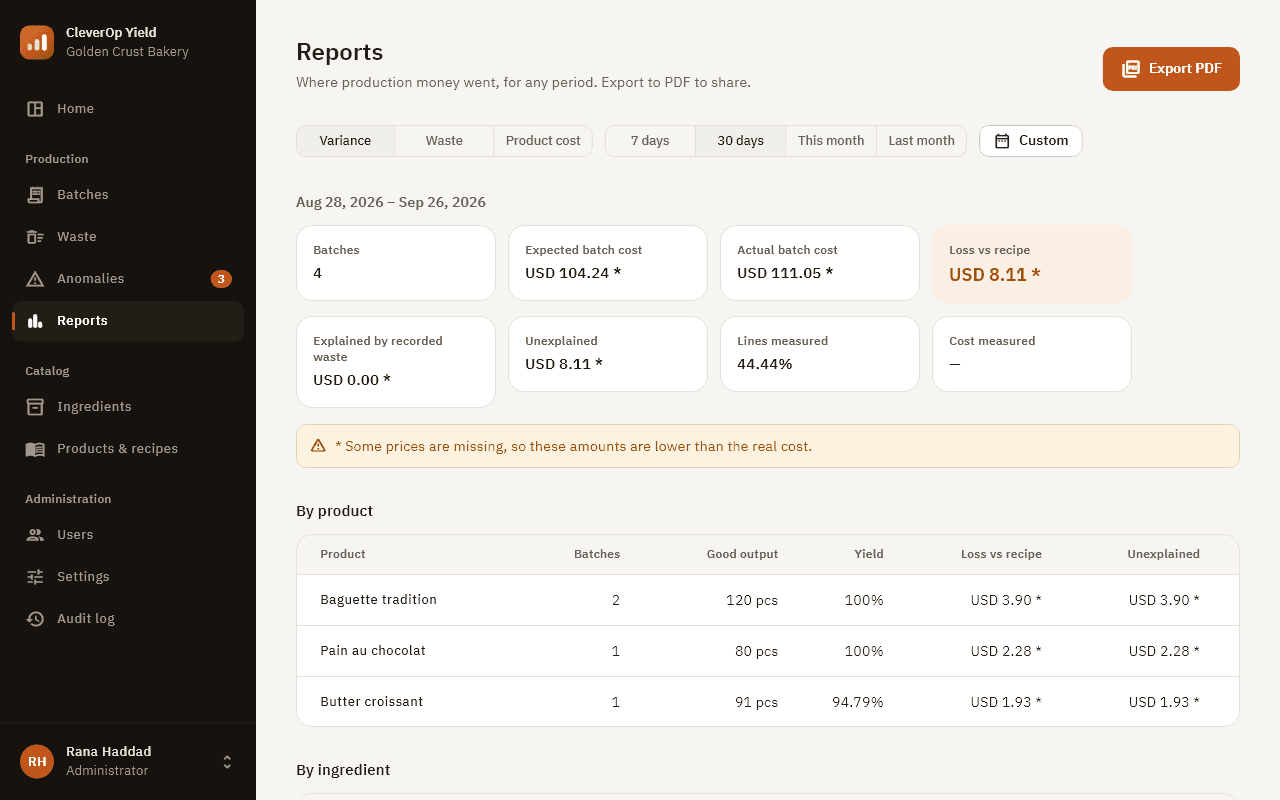
Reports — variance, waste and product cost for any period, exported to PDF. - CleverOp Yield
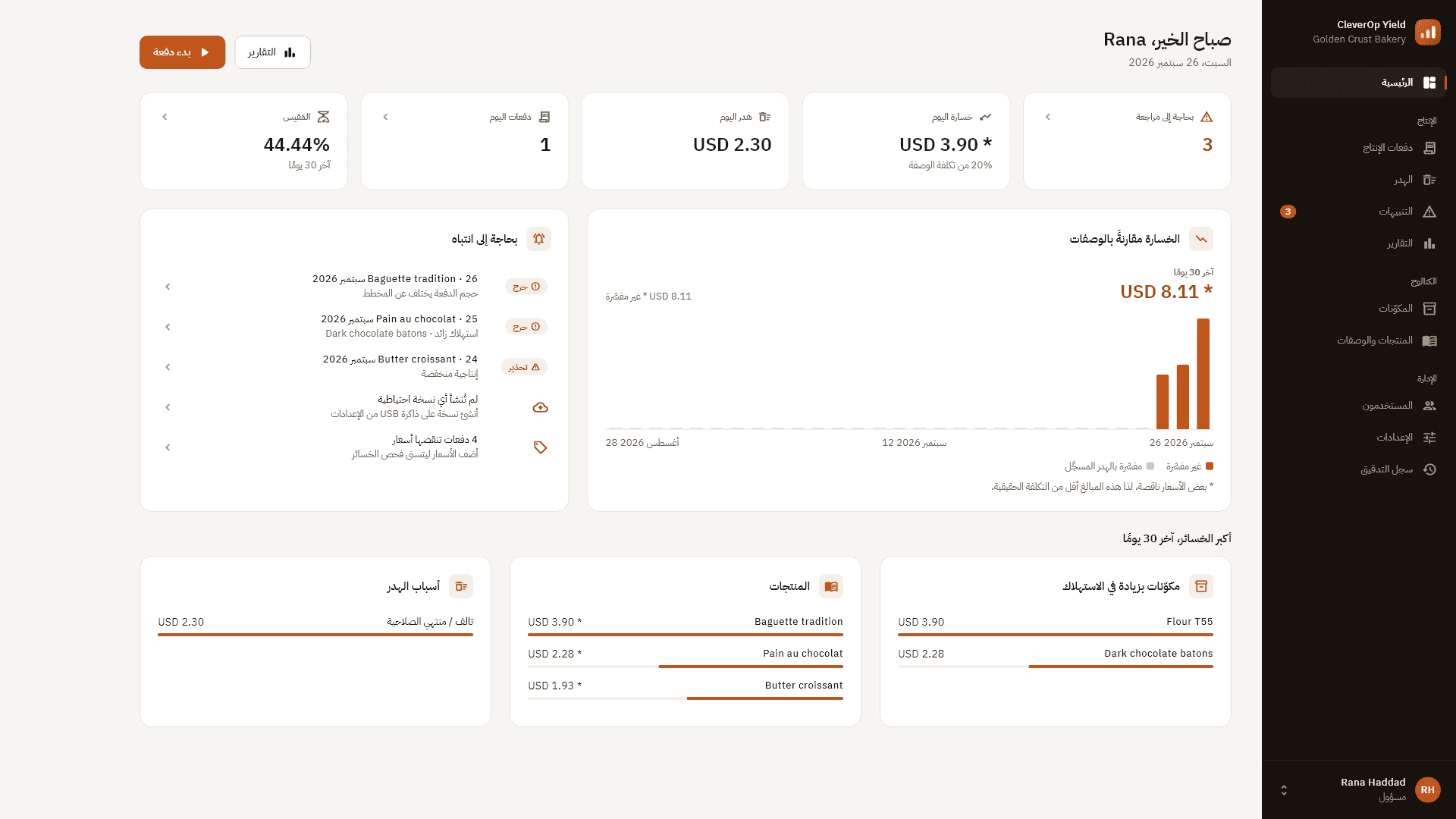
Arabic, right to left — for owners and teams who work in Arabic.
09
Lessons
“Say what’s missing.”
When a price is missing, figures carry a mark and a note instead of looking complete. An honest “incomplete” beats a confident wrong number.
“Offline is a feature.”
No account, no server, no subscription. For a small bakery, software that just works on the office PC is the point.
“Design for the bench.”
Operators work with flour on their hands. Keyboard flow and large, forgiving inputs matter more than features.
10
Current State
v1.1.0 “Trusted Production Capture”
Version 1.1.0 was built in September 2026 with a per-user Windows installer, and has been installed, upgraded and uninstalled on a real PC. Next: owner review, then first pilot sites.
- One PC per site and one currency per installation.
- The installer is not code-signed yet, so Windows SmartScreen shows a warning.
Start a Project
Need software built around your workflow?
I design and build business applications with the same care you see here.