
Excel Automation
Excel that does the repetitive work for you.
Quotes, invoices, reports and month-end routines built as clean Excel workbooks: drop-downs instead of typing, formulas instead of copying, and print layouts that look professional. Start with a free template, or have one built around your business.
Quote & Invoice Generator
One workbook for your quotes and invoices. Choose the client and the items from drop-downs, and the prices, VAT, totals, numbering and due date fill in on their own. Print or save the result as a PDF in English or in Arabic.
Built and tested in Microsoft Excel for Windows. No macros, so Excel opens it without security warnings. All names, prices and numbers inside are fictional sample data.
What it does
- Quote or Invoice from a single drop-down, with automatic references such as INV-2026-0001.
- Client details and item prices fill in from your own lists (10 clients, 12 items).
- English and right-to-left Arabic print layouts, both generated from the same entry.
- VAT, currency and the LBP exchange rate are set once; the LBP equivalent can be switched off.
- Up to 15 lines per document, with a discount per line and an optional price override.
- Due date for invoices and validity date for quotes, calculated for you.
How to use it
- 01SettingsEnter your business details, VAT rate and today’s exchange rate.
- 02Clients and ProductsList the clients you invoice most and the items you sell, with Arabic names if you need them.
- 03EntryPick Quote or Invoice, the client, then the items and quantities.
- 04PrintOpen Print EN or Print AR and press Ctrl+P, or export to PDF.
- Quote-Invoice-Generator.xlsx — Entry
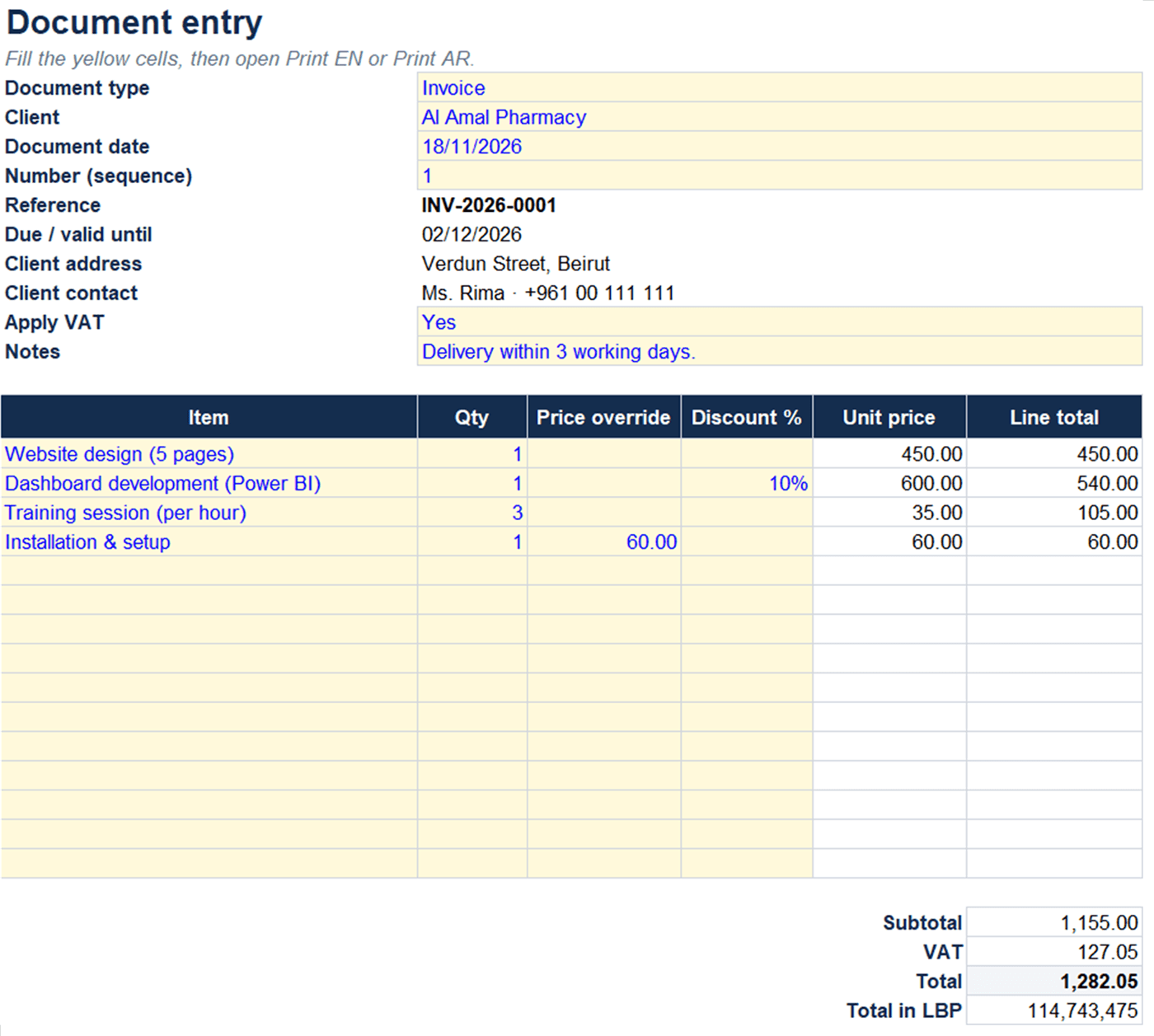
Entry: pick the client and items; prices, VAT and totals calculate themselves.
- Print EN
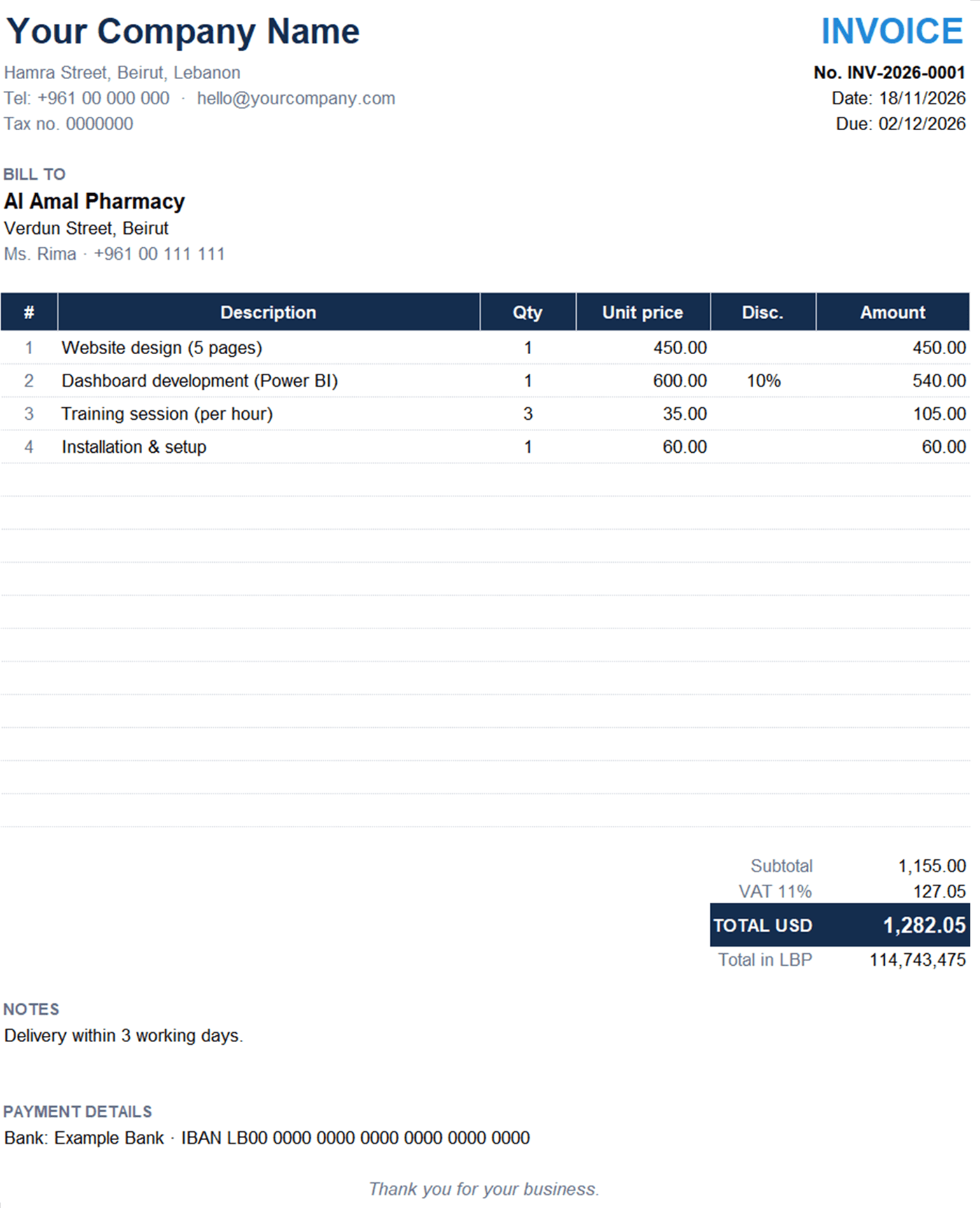
English print layout, ready for PDF. - Print AR
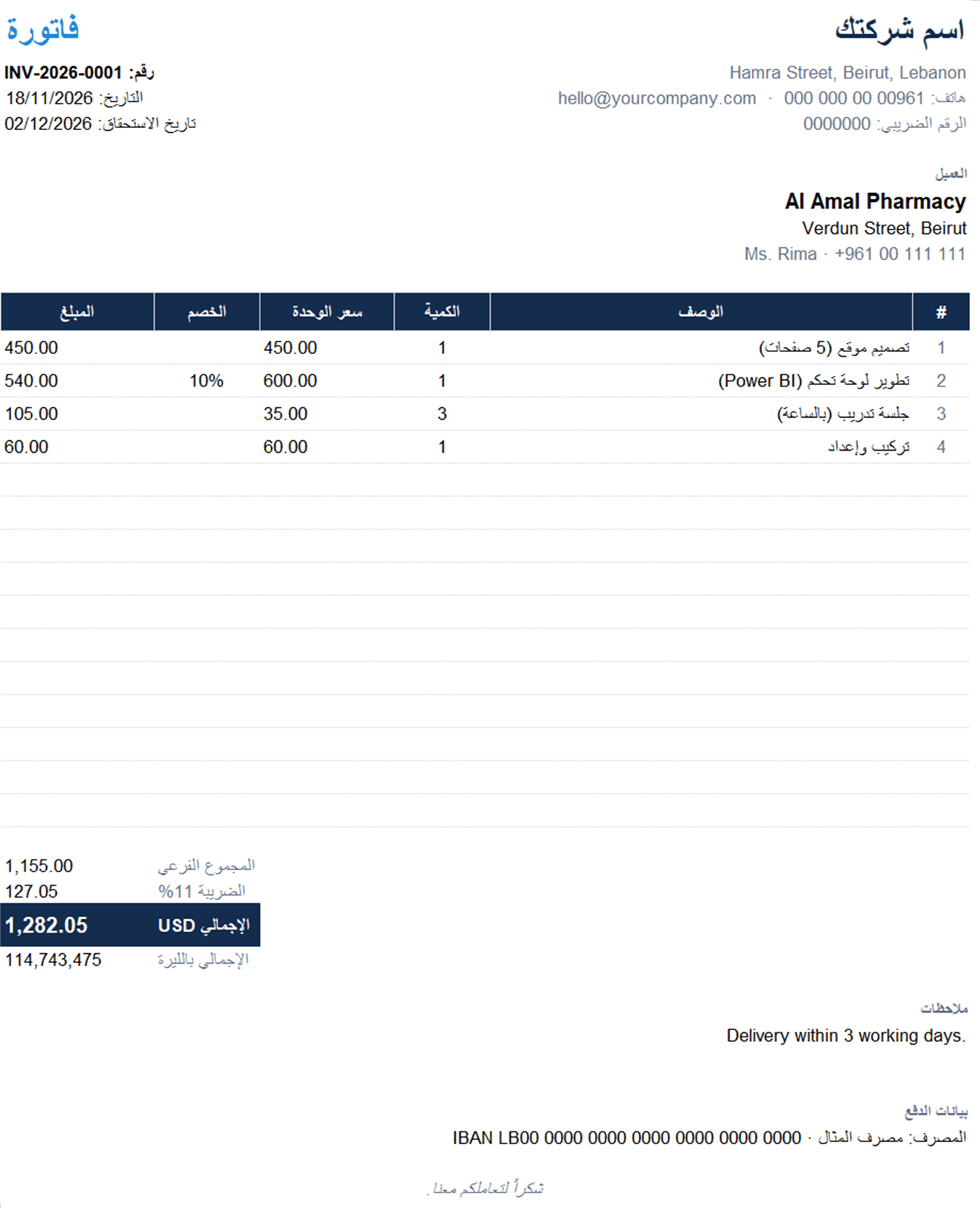
Arabic print layout, mirrored right to left with Arabic item names.
Attendance & Leave Tracker
One workbook to track who was in, who was off and how much leave is left. Pick a code for each day on the month sheet and the totals, attendance rate and yearly leave balance work themselves out. Weekends and public holidays are excluded automatically.
Built and tested in Microsoft Excel for Windows. No macros, so Excel opens it without security warnings. Names, leave days and holiday dates inside are fictional examples, and the template does not give legal advice.
What it does
- Up to 20 employees, with one sheet for each month of the year.
- Pick a code per day: present, late, absent, vacation, sick or unpaid, each with its own colour.
- Weekends and public holidays are greyed and left out of the working-day count. Choose your own weekend, for example Friday and Saturday.
- Each month totals present, absent, vacation, sick, unpaid and late days, and the attendance rate.
- The Year sheet adds up leave used across all months and shows each person’s remaining balance.
- A headcount under every day shows how many people were in.
How to use it
- 01SettingsEnter your company name, the year, your weekend days and public holidays.
- 02EmployeesList your team and each person’s yearly leave entitlement.
- 03Month sheetsOpen the month, then pick a code in each cell. Colours and totals update by themselves.
- 04YearSee leave used, remaining balance and attendance for each person across the year.
- Attendance-Leave-Tracker.xlsx — Oct

A month sheet: pick a code per day; weekends are greyed and the totals and attendance rate calculate themselves. - Year
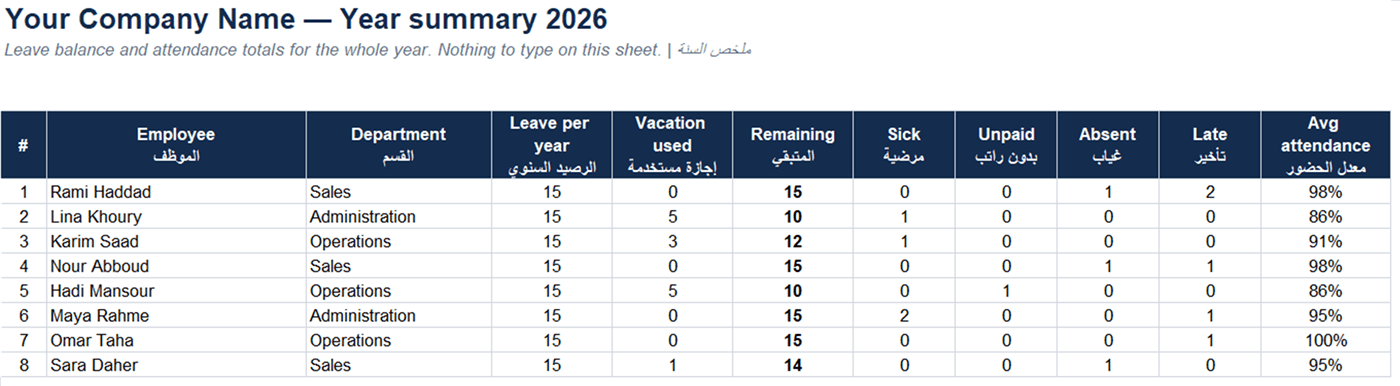
The Year sheet: leave used and remaining balance for each person, plus sick, unpaid, absent and late days.
Want it built around your business?
I can add your logo and colours, more lines or currencies, one-click PDF export, a customer statement, stock deduction, or connect it to a Power BI report. Tell me how you work today and I will propose the simplest version that saves you time.
Also see
Frequently asked questions
Is the template really free?
Yes. Download it with one click, no email or sign-up needed, and use it for your own business as long as you like.
Does it use macros, and which programs does it work in?
No macros, so Excel opens it without security warnings. It was built and tested in Microsoft Excel for Windows. I have not tested it in Excel for Mac, Google Sheets or LibreOffice, so I cannot promise it behaves the same there.
Is the 11% VAT correct for my business?
11% is only a starting value, the standard VAT rate in Lebanon. Set your own rate on the Settings sheet, or switch VAT off on a document. The template does not give tax advice.
How do I update the exchange rate?
Type the rate you use into the Settings sheet. The workbook does not fetch live rates, so update it whenever you issue a document. You can also hide the LBP equivalent.
How many clients, items and lines can it hold?
The free version holds 10 clients, 12 items and 15 lines per document. A custom version can hold more.
Can I add my logo and create PDFs in one click?
In the free version you can insert your logo as a picture on the print sheet, and create a PDF with File, Export or Print. One-click PDF export and a logo built into the layout are part of a custom version.
Can you build something similar for my business?
Yes. Describe how you work today (quotes, stock, attendance, month-end reports) and I will propose the simplest workbook that removes the repeated typing.
Does the attendance template follow Lebanese labour law?
No. The 15 leave days and the holiday dates are example values you can change on the Employees and Settings sheets. The template counts what you enter and does not give legal or payroll advice.
Can the attendance template handle a Friday and Saturday weekend, or shifts?
You can choose any two weekend days, or none, on the Settings sheet. It records one status per person per day, so shifts and overtime hours need a custom version. It holds 20 employees, with one sheet for each month.
Start a Project
Have a website, application or business process in mind?
Tell me what you’re trying to improve. We can turn the idea into a practical digital solution.